

WordPress is a dynamic content management system (CMS), meaning all the content, settings, and configurations of a WordPress site are stored in a MySQL (or MariaDB) database. The PHP-based WordPress core interacts with this database to retrieve, display, and update information whenever a visitor loads the website.
What the Database Stores
The database holds almost everything about your site, including:
- Content: Posts, pages, custom post types, revisions, drafts
- Users: Usernames, passwords (hashed), roles, permissions
- Settings: Site URL, theme options, plugin configurations
- Media: File references (images, videos, docs — though the files themselves are stored on the server, their paths and metadata are stored in the DB)
- Comments: Comment text, author info, approval status
- Taxonomies: Categories, tags, and custom taxonomies
- Links & Metadata: Post meta, user meta, term meta
The Default WordPress Database Tables
By default, a fresh WordPress installation creates 12 core tables. Each table has a specific purpose:
1. wp_posts
This is the core table of WordPress. It stores posts, pages, custom post types, attachments, and revisions. Almost all site content lives here.
Columns:
ID– Unique identifier for each post (Primary Key)post_author– ID of the user who created the post (reference towp_users.ID)post_date– Date and time when the post was createdpost_date_gmt– Same as above, in GMTpost_content– Main content of the post/pagepost_title– Title of the postpost_excerpt– Short summary or excerptpost_status– Status (e.g., publish, draft, trash)comment_status– Whether comments are allowed (open/closed)ping_status– Whether pingbacks/trackbacks are allowedpost_password– Password for password-protected postspost_name– URL-friendly slugto_ping– Sites to pingpinged– Sites that have been pingedpost_modified– Last modified date/timepost_modified_gmt– Last modified date/time in GMTpost_content_filtered– Used internally for filtered contentpost_parent– ID of parent post (for page hierarchy, attachments)guid– Unique reference link (often used for media attachments)menu_order– Order of pages in menuspost_type– Type (post, page, attachment, nav_menu_item, custom)post_mime_type– MIME type (for attachments, e.g., image/jpeg)comment_count– Number of comments related to the post
2. wp_postmeta
Stores extra information (metadata) about posts, often used by themes and plugins.
Columns:
meta_id– Unique identifier for each rowpost_id– Related post ID (wp_posts.ID)meta_key– The key (e.g.,_thumbnail_id,_yoast_wpseo_title)meta_value– The value for the key
3. wp_users
Stores information about registered users.
Columns:
ID– Unique user ID (Primary Key)user_login– Username for loginuser_pass– Password (hashed)user_nicename– URL-friendly nameuser_email– User’s emailuser_url– User’s websiteuser_registered– Registration dateuser_activation_key– Key for account activation/password resetuser_status– Not commonly used (historical)display_name– Name displayed publicly
4. wp_usermeta
Stores metadata for users (roles, preferences, custom fields).
Columns:
umeta_id– Unique row IDuser_id– ID of the user (wp_users.ID)meta_key– Key (e.g.,wp_capabilities,wp_user_level)meta_value– Value for the key (often serialized arrays)
5. wp_comments
Stores all comments left on posts/pages.
Columns:
comment_ID– Unique ID for each commentcomment_post_ID– ID of the post the comment belongs tocomment_author– Name of the commentercomment_author_email– Email address of commentercomment_author_url– Website of commentercomment_author_IP– IP address of commentercomment_date– Date/time of commentcomment_date_gmt– Date/time in GMTcomment_content– The actual comment textcomment_karma– Used for rating (not widely used)comment_approved– Approval status (1, 0, spam)comment_agent– User agent string (browser info)comment_type– Type (comment, pingback, trackback)comment_parent– ID of parent comment (for nested replies)user_id– ID of registered user (if commenter is logged in)
6. wp_commentmeta
Stores metadata for comments.
Columns:
meta_id– Unique row IDcomment_id– ID of the comment (wp_comments.comment_ID)meta_key– Metadata key (e.g.,_akismet_result)meta_value– Metadata value
7. wp_terms
Stores terms used for categories, tags, and custom taxonomies.
Columns:
term_id– Unique ID for the termname– Human-readable name (e.g., "Technology")slug– URL-friendly nameterm_group– Groups terms (rarely used)
8. wp_termmeta
Stores metadata for terms (extra info about categories/tags).
Columns:
meta_id– Unique row IDterm_id– ID of the term (wp_terms.term_id)meta_key– Metadata keymeta_value– Metadata value
9. wp_term_taxonomy
Defines the taxonomy of a term (category, tag, or custom).
Columns:
term_taxonomy_id– Unique IDterm_id– ID of the term (wp_terms)taxonomy– Type (category, post_tag, custom)description– Description of the termparent– Parent ID (for hierarchical taxonomies)count– Number of posts linked to this term
10. wp_term_relationships
Maps posts to terms.
Columns:
object_id– The ID of the object (usuallywp_posts.ID)term_taxonomy_id– ID fromwp_term_taxonomyterm_order– Ordering (rarely used)
11. wp_options
Stores site-wide settings and plugin/theme configurations.
Columns:
option_id– Unique IDoption_name– Name of the option (e.g.,siteurl,home)option_value– Value of the option (often serialized arrays)autoload– Whether to autoload option (yes/no)
12. wp_links
Stores blogroll links (legacy feature). Still present for compatibility.
Columns:
link_id– Unique IDlink_url– URL of the linklink_name– Name of the linklink_image– Related image URLlink_target– Target attribute (_blank, _top)link_description– Description textlink_visible– Visibility (Y/N)link_owner– User ID of link creatorlink_rating– Rating (0–10)link_updated– Last updated datelink_rel– Relationship valuelink_notes– Notes about the linklink_rss– RSS feed for the link
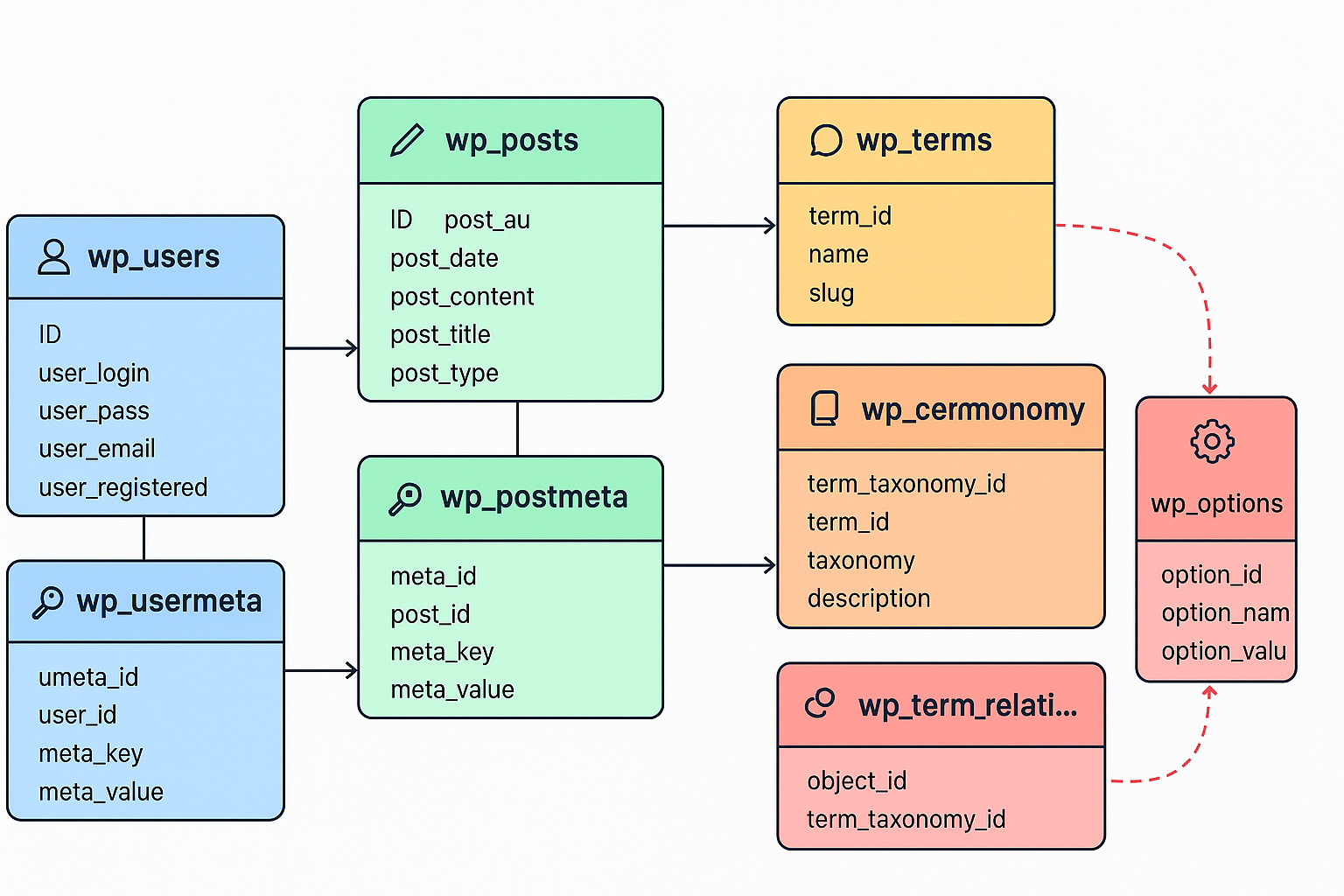
How WordPress Uses the Database
When a visitor opens your site:
- WordPress connects to the database using credentials in
wp-config.php(DB_NAME,DB_USER,DB_PASSWORD,DB_HOST). - It runs SQL queries to fetch content (e.g., fetching post content from
wp_posts). - PHP processes the query results.
- The theme (HTML + CSS) displays it in a user-friendly format.
Example Query:
SELECT * FROM wp_posts WHERE post_status = 'publish' AND post_type = 'post';This fetches all published blog posts.
4. Common Database Operations
- Create → Adding a new post, page, or user inserts data into tables
- Read → Loading a page fetches data from
wp_posts,wp_options, etc. - Update → Editing content updates existing rows
- Delete → Removing content deletes rows or marks them as trash
5. Database Optimization & Maintenance
Since WordPress constantly interacts with the database, optimization ensures speed and security.
Best Practices
- Regularly clean up unused data (spam comments, revisions)
- Use a caching plugin (reduces database queries)
- Optimize tables with SQL or plugins like WP-Optimize
- Backup the database frequently
- Secure database access (strong passwords, change default
wp_prefix)
6. Plugins & Custom Tables
Many plugins create their own tables to store data.
Example: WooCommerce creates tables for orders, products, and customers. Developers can also create custom tables for advanced needs.
7. Visualizing the Database Flow
Imagine the database as the heart of WordPress:
- Posts/Pages → Stored in
wp_posts - Settings → Stored in
wp_options - Users → Stored in
wp_users - Plugins/Themes → Store settings in
wp_optionsor custom tables - Categories/Tags → Stored in
wp_termsand linked viawp_term_relationships
Every request → Goes through SQL → Processed by PHP → Displayed via theme
In Summary
The WordPress database is a structured storage system that powers everything from posts and settings to users and plugins. Understanding its structure helps in troubleshooting, optimization, and advanced customization.