

The JavaScript Learning Roadmap is designed for beginners who want to move step by step towards becoming confident with JavaScript.
Think of it this way:
- HTML → Skeleton (structure)
- CSS → Clothes (style)
- JavaScript → Brain (makes everything alive)
This roadmap takes you from zero to mastery, with easy explanations, real-life examples, and practice exercises.
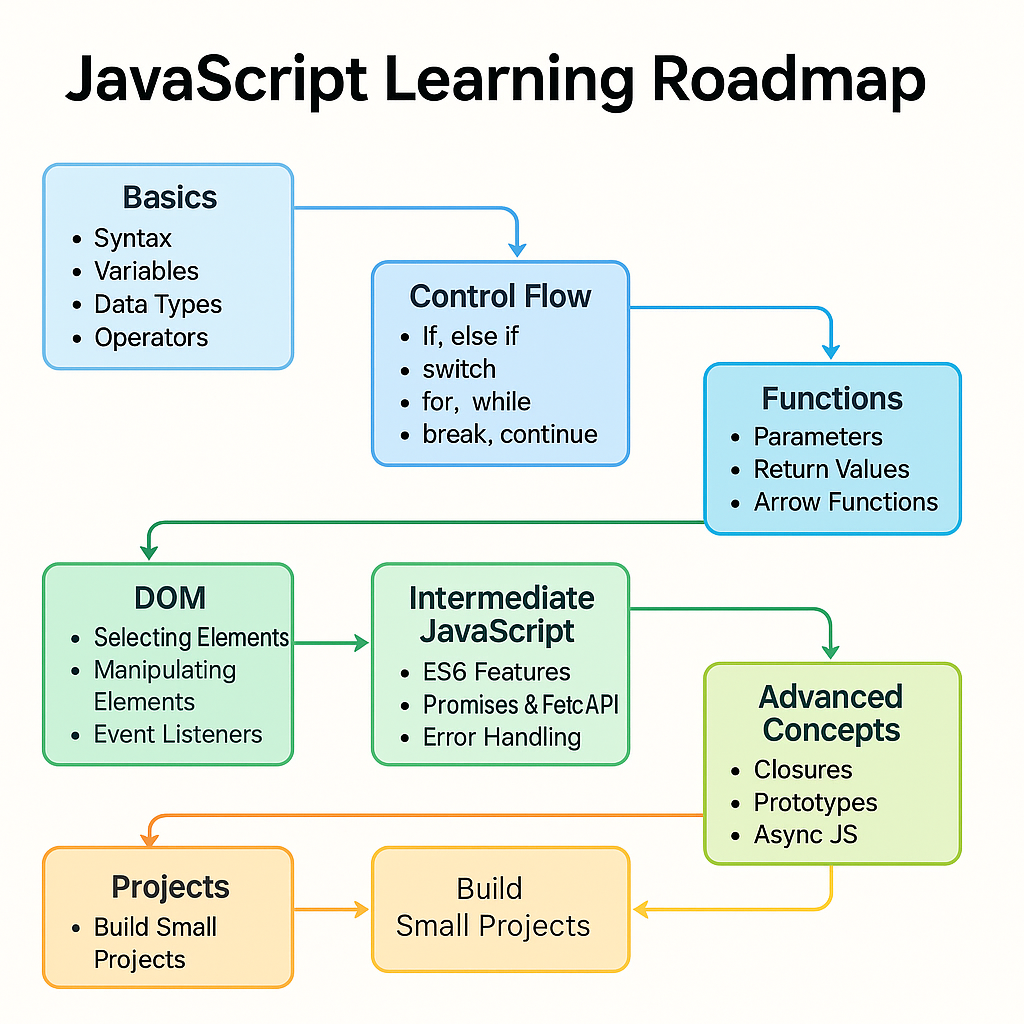 JavaScript Learning Roadmap
🟢 Step 1: Basics of JavaScript
Concept: JavaScript can store information and perform actions.
- Variables → boxes where you keep data
- Data Types → the kind of data inside (numbers, text, true/false)
- Operators → actions you perform on data (+, -, *)
Example: Shopping cart system
let productName = "Laptop";   // string
let price = 50000;            // number
let inStock = true;           // boolean
console.log("Product:", productName);
console.log("Price:", price);
console.log("Available:", inStock);
👉 Practice: Create variables for a bus ticket system (passenger name, seat number, isPaid).
🟢 Step 2: Control Flow
Concept: Control flow decides what happens next.
- If something is true → do this
- Else → do something else
- Repeat actions using loops
Example: Supermarket discount system
let amount = 1200;
if (amount > 1000) {
  console.log("You get a 10% discount!");
} else {
  console.log("No discount available.");
}
👉 Practice: Print numbers 1–16 using a for loop.
🟢 Step 3: Functions
Concept: Functions are like machines — input → process → output.
Example: ATM → You insert a card (input), it checks the details (process), then gives cash (output).
function isEven(num) {
  return num % 2 === 0;
}
console.log(isEven(10)); // true
console.log(isEven(7));  // false
👉 Practice: Write a function to calculate the square of a number.
🟢 Step 4: Arrays and Objects
Concept:
- An array = a list of items (like a row of seats in a bus).
- Object = item with details (like a passenger with name, seat, ticket number).
Example: Shopping Cart Total.
let cart = [
  { product: "Mobile", price: 15000 },
  { product: "Headphones", price: 2000 },
  { product: "Charger", price: 800 }
];
let total = cart.reduce((sum, item) => sum + item.price, 0);
console.log("Total Cart Value:", total);
👉 Practice: Create an array of products with prices and calculate the total
🟢 Step 5: DOM (Document Object Model)
Concept: The DOM connects HTML with JavaScript. You can select elements, change them, and react to user actions.
Example: To-Do App
<input id="taskInput" placeholder="Enter task">
<button id="addBtn">Add Task</button>
<ul id="taskList"></ul>
let btn = document.getElementById("addBtn");
btn.addEventListener("click", function () {
let input = document.getElementById("taskInput").value;
let li = document.createElement("li");
li.textContent = input;
document.getElementById("taskList").appendChild(li);
});👉 Practice: Make a button that changes the background color when clicked.
🟢 Step 6: Mastery JavaScript
Concepts:
- ES6 features (shortcuts)
- Promises &
async/await(handle waiting) - Fetch API (get data from the internet)
Example: Fetch GitHub profile
async function getUser(username) {
  let response = await fetch(`https://api.github.com/users/${username}`);
  let data = await response.json();
  console.log(data);
}

getUser("torvalds");
👉 Practice: Fetch and display weather data for your city.
🟢 Step 7: Advanced Concepts
Concepts:
- Closures → functions inside functions
- Classes → create blueprints for objects
- Event loop → how JavaScript handles tasks in the background
Example: Bank account system using a class
class BankAccount {
  constructor(name, balance) {
    this.name = name;
    this.balance = balance;
  }
  deposit(amount) {
    this.balance += amount;
  }
  withdraw(amount) {
    this.balance -= amount;
  }
}

let account = new BankAccount("Arun", 5000);
account.deposit(2000);
console.log(account.balance); // 7000
🟢 Step 8: Build Projects 🚀
Learning becomes real when you build projects:
- Digital Clock
- Calculator
- Weather App (API)
- Expense Tracker
- Tic-Tac-Toe Game
🔹 Conclusion
Learning JavaScript is like climbing stairs: Basics → Functions → DOM → Intermediate → Advanced → Projects. Take one step at a time, practice consistently, and you’ll gain real skills.
👉 Next Steps for Learners
If your goal is to become a JavaScript developer, start here:
-
📘 Learn JavaScript – Step-by-Step Guide
A structured, beginner-friendly guide that takes you deeper into JavaScript with practical examples.
-
🎯 Personalized JavaScript Developer Coaching
Get 1:1 guidance, code reviews, and career tips tailored to your learning style and goals.
Take the next step and turn your practice into real developer skills! 🚀