

WordPress is famous for its massive ecosystem of plugins, allowing users to add almost any functionality to their site with a few clicks. But there's a dark side to this convenience: Abandoned and outdated plugins.
While installing a plugin is easy, maintaining it is often overlooked. Many website owners forget about the plugins they installed years ago. Meanwhile, developers may stop updating them. This combination creates a perfect storm for security breaches.
In this guide, we’ll explore why abandoned plugins are dangerous, how hackers exploit them, and what you can do to protect your site.
What is an Abandoned Plugin?
A WordPress plugin is considered "abandoned" when its developer stops releasing updates or providing support. This usually happens when:
- The developer loses interest or time.
- The plugin was a hobby project that got too popular to maintain.
- The plugin has been superseded by a better tool.
Key Warning Signs:
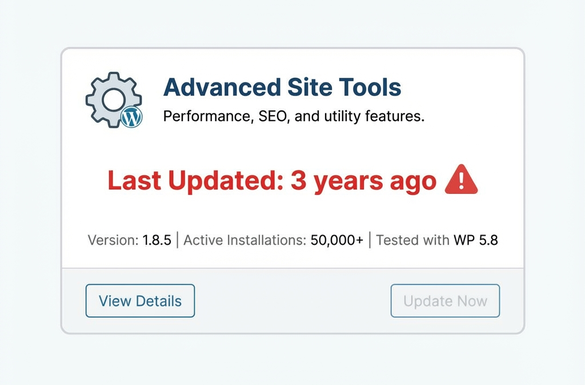
- ** "This plugin hasn’t been tested with the latest 3 major releases of WordPress."** warning in the repository.
- Last updated date is more than 2 years ago.
- Unanswered support threads in the forum.
Why Are They Dangerous?
Abandoned plugins don't just stop working; they become open doors for attackers.
1. Unpatched Security Vulnerabilities
When a security flaw is discovered in an active plugin, the developer releases a patch (update) to fix it. With abandoned plugins, no one is fixing the holes. Hackers know this and specifically target sites using these "zombie" plugins.
2. Incompatibility with Newer PHP/WordPress Versions
WordPress and PHP evolve constantly. An old plugin might rely on deprecated code that breaks your site or creates error logs that expose system paths to attackers.
3. Supply Chain Attacks
Sometimes, abandoned plugins are sold or transferred to malicious actors who release an "update" containing malware, backdoors, or spam injections.
Visual Guide: The Hackers' Path
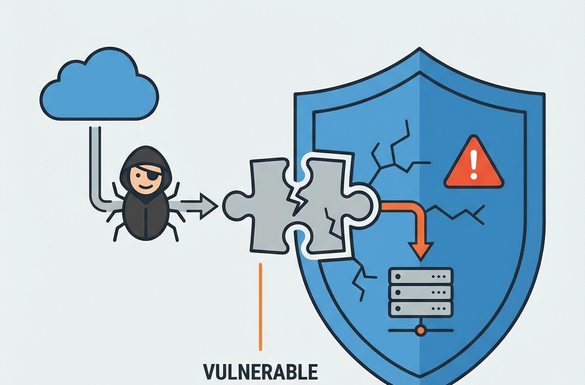
As shown above, a single vulnerability in an ignored plugin can bypass your entire security setup, giving attackers access to your database, customer data, and server files.
Real-World Consequences
What happens if you get hacked through a plugin?
- Data Theft: Customer emails and passwords stolen.
- SEO Spam: Your site redirects to illegal pharmaceutical or gambling sites.
- Ransomware: Your site is locked until you pay a fee.
- Blacklisting: Google marks your site as "Deceptive," destroying your traffic.
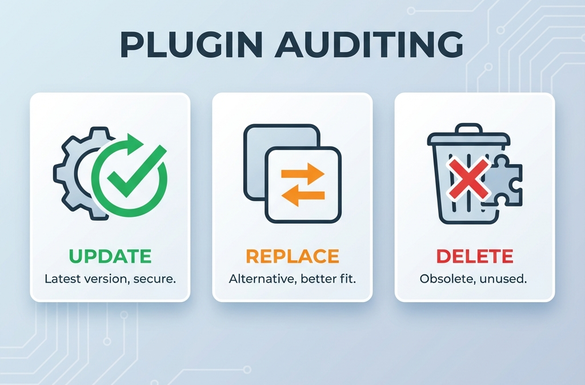
How to Audit Your Plugins (3-Step Check)
Step 1: The "Last Updated" Check
Go to your Plugins page in the WordPress dashboard. Click "View Details" on each plugin. If the "Last Updated" date is more than 1 year ago, flag it for replacement.
Step 2: The Vulnerability Scan
Use a security plugin like Wordfence or Solid Security to scan your site. They maintain databases of known vulnerabilities and will alert you if you're running risky software.
Step 3: Remove Unused Plugins
If a plugin is deactivated, delete it. Deactivated plugins significantly can still contain executable files that hackers can trigger.
Best Practices for Plugin Safety
- Limit Your Plugins: The fewer plugins you have, the smaller your attack surface.
- Enable Auto-Updates: For trusted plugins, turn on auto-updates to get security patches instantly.
- Choose Reputable Developers: specific Look for plugins with high active install counts and recent reviews.
- Regular Backups: Always have a daily backup so you can restore your site if an update goes wrong or a breach occurs.
Conclusion
Your WordPress site is only as secure as its weakest link. Often, that link is a forgotten plugin gathering dust in your dashboard. Take time today to audit your plugins, replace the abandoned ones, and delete what you don't use. Your future self (and your visitors) will thank you.
Need a Professional Security Audit?
Unsure if your site is safe? Let our WordPress experts verify your installation, clean up old code, and harden your security.