

Introduction
Have you ever heard the phrase, "It works on my machine!"?
It’s the classic developer excuse. You write code, it runs perfectly on your laptop, but the moment you deploy it to a server or send it to a colleague, it crashes. Missing dependencies, different OS versions, or conflicting libraries—it’s a nightmare.
Enter Docker.
Docker solves this problem once and for all. It allows you to package your application and everything it needs (libraries, dependencies, settings) into a single, lightweight unit called a container. If it works in Docker, it works everywhere.
In this guide, we’ll break down exactly what Docker is, how it works, and why it’s the industry standard for modern software development.
What is Docker?
Docker is an open-source platform that uses OS-level virtualization to deliver software in packages called containers.
Think of it like a shipping container in the logistics industry. Before shipping containers, transporting goods was chaotic. You had barrels, sacks, and crates of different sizes. Loading them onto a ship was slow and inefficient.
Then came the standard shipping container. It didn't matter if you were shipping cars, pianos, or bananas—the container was always the same size. It fit on any ship, any truck, and any crane.
Docker does the same for software. It wraps your code in a standard container that runs on any infrastructure—laptop, cloud, or on-premise server—without modification.
How Docker Works (Architecture)
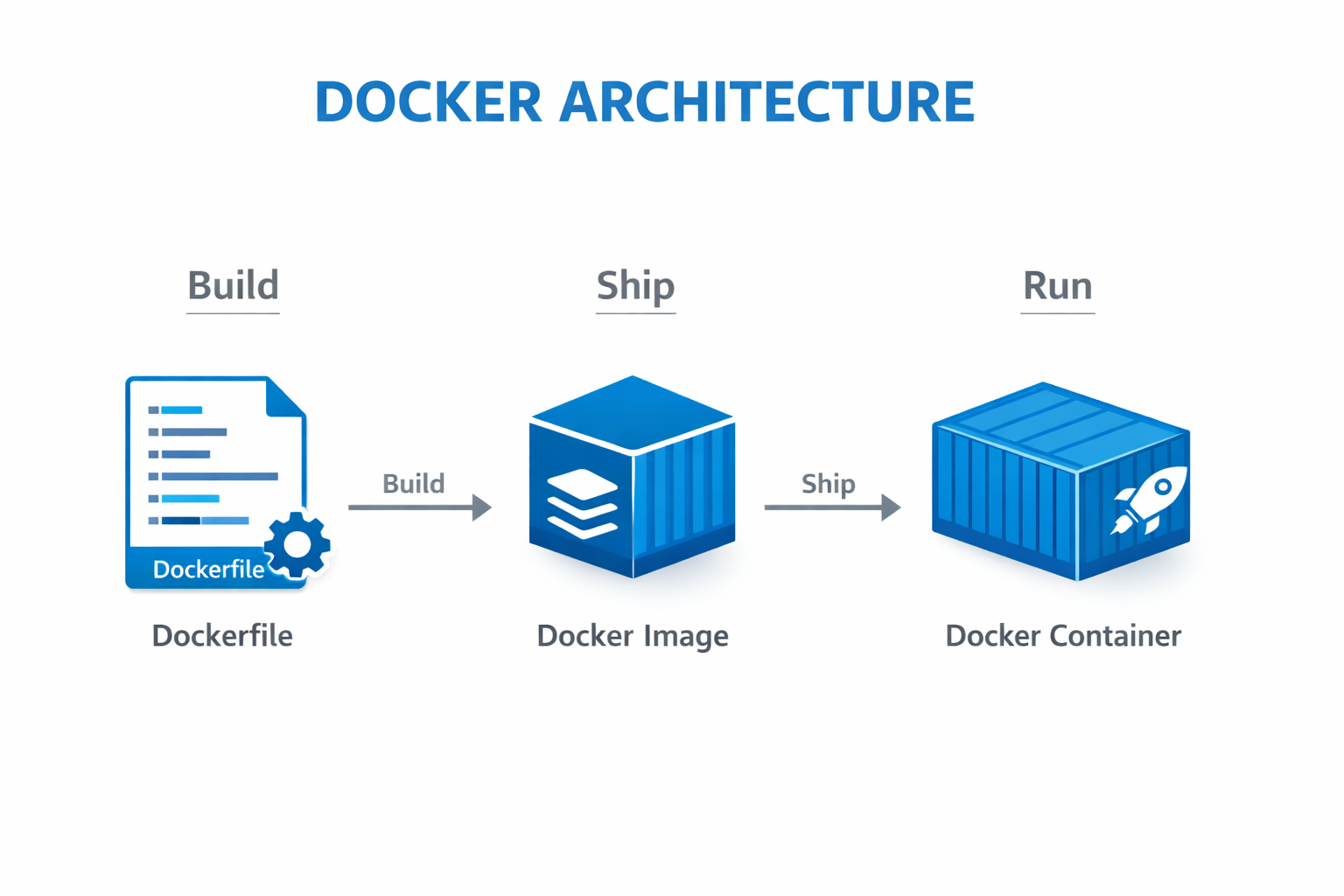
To understand Docker, you need to know its three core components:
- Dockerfile (The Recipe): A text file containing instructions to build an image.
- Docker Image (The Blueprint): A read-only template built from the Dockerfile. It contains your code and dependencies.
- Docker Container (The House): A running instance of an image.
The Workflow
Here is a simple text-based diagram of how these components interact:
Docker vs. Virtual Machines (VMs)
This is the most common question beginners ask. "Isn't Docker just a lightweight VM?"
Not quite. The key difference lies in what they virtualize.
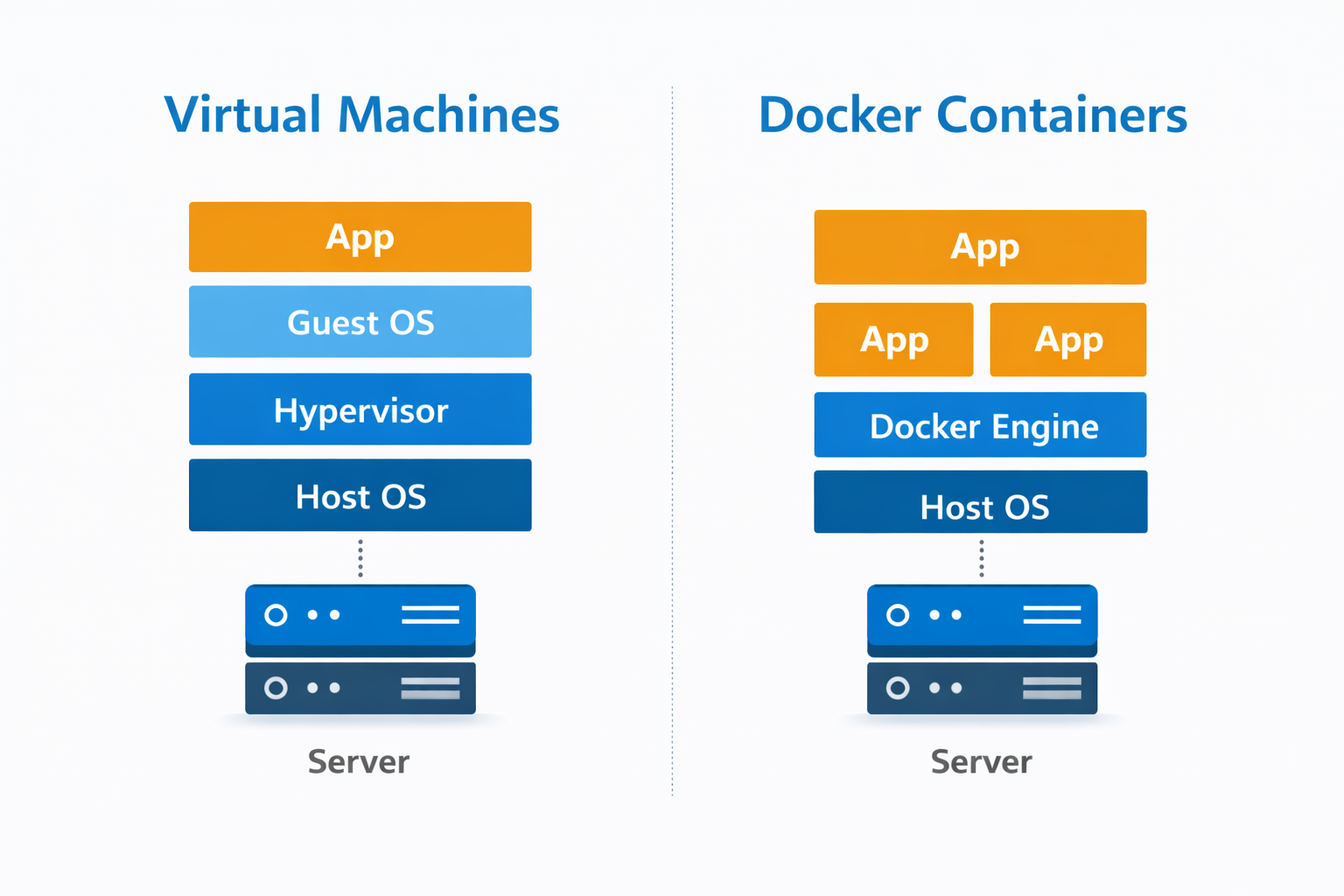
- Virtual Machines virtualize the hardware. Each VM runs a full Operating System (Guest OS) on top of a Hypervisor. This makes them heavy and slow to boot.
- Docker Containers virtualize the Operating System. They share the host machine's OS kernel but keep the application processes isolated. This makes them incredibly lightweight and fast.
Architecture Comparison
Key Differences
| Feature | Virtual Machines | Docker Containers |
|---|---|---|
| Size | Gigabytes (GB) | Megabytes (MB) |
| Boot Time | Minutes | Milliseconds |
| Performance | Slower (Overhead) | Near Native |
| Isolation | Complete (OS level) | Process Level |
| Portability | Low | High |
Why is Docker Important?
1. Consistency
Your development environment is identical to production. No more surprises when you deploy.
2. Efficiency
You can run many more containers than VMs on the same hardware because they don't need separate OSs.
3. Isolation
You can run a Python 2 app and a Python 3 app on the same server without them fighting over libraries. Each lives in its own bubble.
4. CI/CD Integration
Docker is the backbone of modern DevOps. It allows you to build, test, and deploy applications automatically in pipelines.
Real-World Examples
Example 1: The "Python + Redis" App
Imagine you are building a web app using Python (Flask) that needs a Redis database.
Without Docker:
- Install Python on your machine.
- Install Redis on your machine (hope it doesn't conflict with another version).
- Configure them to talk to each other.
- Repeat this for every new developer joining the team.
With Docker:
You write a docker-compose.yml file:
version: '3'
services:
  web:
    image: python:3.9
    command: python app.py
  redis:
    image: "redis:alpine"
Now, any developer just runs docker-compose up, and boom—they have the full app and database running instantly.
Example 2: Legacy Applications
Your company has an old Java 7 application that powers a critical internal tool. Upgrading the server to a modern OS breaks the app because Java 7 is no longer supported natively.
Solution: Containerize the legacy app with a Java 7 base image. It can now run safely on your modern servers forever, isolated from the rest of the system.
Conclusion
Docker has revolutionized the way we build, ship, and run software. It has moved us away from the "works on my machine" era to a world of portable, efficient, and scalable applications.
If you are looking to get into DevOps, Cloud Engineering, or Backend Development, learning Docker is not optional—it’s mandatory.
Ready to start? Download Docker Desktop and try running your first container today!