


Introduction
There was a time when "getting hacked" meant a skilled individual specifically targeted you, spent days finding a vulnerability, and manually exploited it.
Those days are over.
Today, the internet is a hostile environment where automation rules. Every public-facing server, regardless of its size or importance, is constantly scanned by botnets looking for the low-hanging fruit. If you spin up a fresh server on DigitalOcean or AWS and check the logs 10 minutes later, you will already see failed login attempts.
Security is no longer an "enterprise" feature; it is a mandatory requirement for anyone putting code on the internet.
How Cyber Attacks Work Today
Modern attacks are a numbers game. Attackers don't care who you are; they care what you are running.
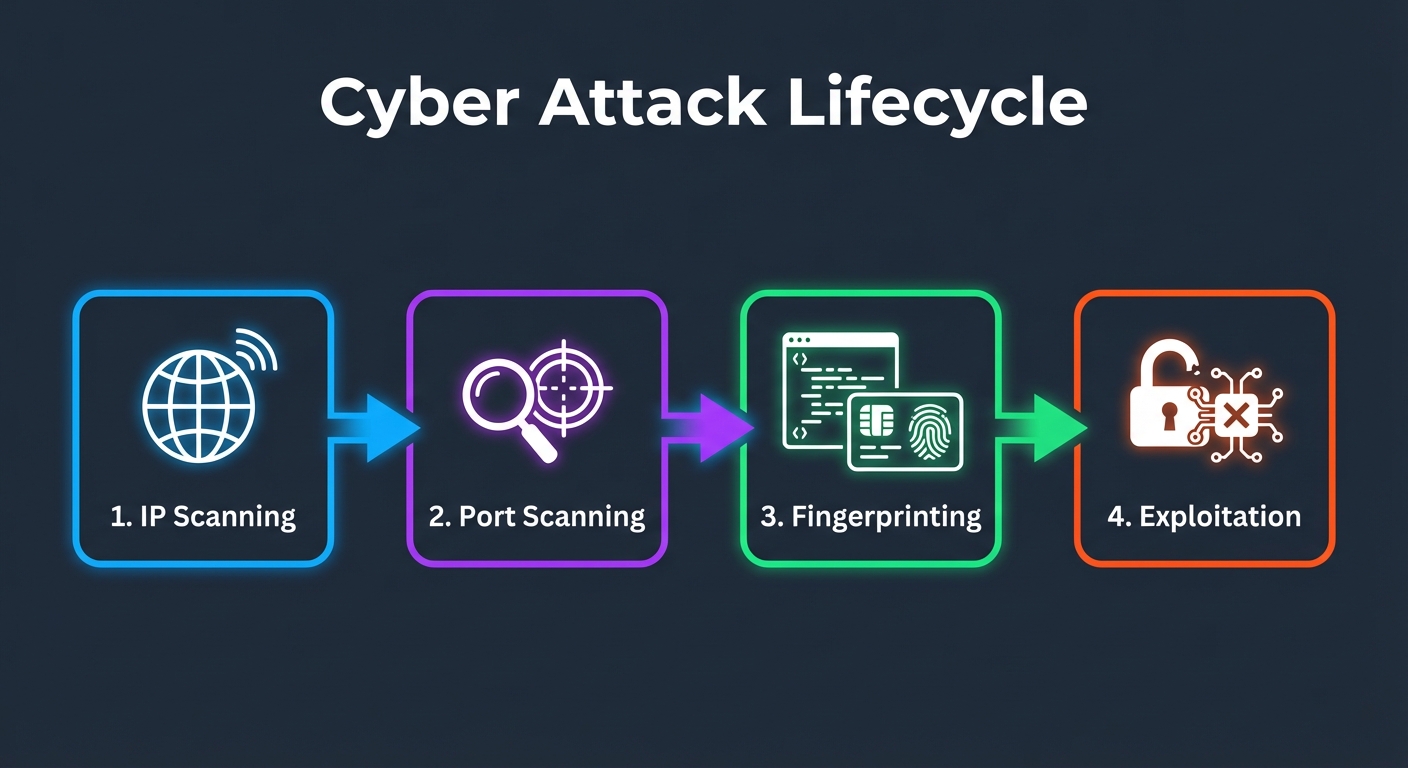
The Automated Kill Chain
- IP Scanning: Botnets scan the entire IPv4 address space (which is surprisingly small) looking for active hosts.
- Port Scanning: Once a host is found, they scan for open ports (22 for SSH, 80/443 for Web, 3306 for MySQL, etc.).
- Fingerprinting: They analyze the responses to identify the software version (e.g., "Apache 2.4.49" or "OpenSSH 8.2").
- Auto-Exploitation: If a known vulnerability exists for that version, or if a port allows password authentication, the bot automatically attempts to break in.
Common Entry Points Attackers Exploit
Attackers are lazy. They look for the easiest way in.
1. SSH Password Attacks
This is the #1 vector. Bots have lists of millions of common usernames and passwords (root/password, admin/123456). If your server allows password authentication on port 22, it will eventually be brute-forced.
2. Exposed Database Ports
Leaving a database (MySQL, PostgreSQL, Redis) exposed to the public internet is a recipe for disaster. Attackers scan for port 3306 or 5432 and try default credentials.
3. Outdated Software
"I'll update it later" is a dangerous mindset. When a critical vulnerability (like Log4j) is published, scanners start looking for it within minutes.
4. Misconfigured Docker
Docker is powerful, but default settings can be risky. Publishing ports globally (-p 8080:80) often bypasses system firewalls (UFW), leaving containers wide open.
Why "Secure by Default" Is Mandatory Today
Default server installations are designed for compatibility, not security. They leave ports open and features enabled to ensure things "just work."
Relying on "hardening it later" usually means "hardening it after the breach." A production server must be treated as a fortress from the moment it boots.
This brings us to the concept of Defense in Depth: never rely on a single layer of security. If the firewall fails, the authentication should hold. If authentication fails, the application isolation should contain the damage.
Must-Have Security Layers for Any Production Server
Here is the non-negotiable stack for a modern, secure server.
1. Edge Protection (CDN / WAF)
Tool: Cloudflare, AWS WAF Stop attacks before they even reach your server. A Web Application Firewall (WAF) filters out malicious traffic, DDoS attacks, and bad bots at the network edge.
2. Server Firewall
Tool: UFW (Ubuntu), iptables, AWS Security Groups Your server should be a black box. Deny all incoming traffic by default, and only allow what is absolutely necessary (usually just ports 80, 443, and your custom SSH port).
3. SSH Hardening
Tool: OpenSSH Config, Fail2Ban
- Disable Password Auth: Use SSH keys only.
- Change Default Port: Moving SSH from 22 to something like 2222 reduces log noise by 99%.
- Fail2Ban: Automatically ban IPs that fail login attempts repeatedly.
4. Container Isolation
Tool: Docker, CapRover Don't install apps directly on the host OS. Run them in containers. This limits the "blast radius" if an application is compromised.
Does Security Affect Performance?
A common myth is that firewalls and security layers slow down your server.
The reality is the opposite. Blocking malicious traffic improves performance.
Processing a request takes CPU cycles. If your server is busy responding to 1,000 bot login attempts per second, your actual users will suffer. A firewall drops these packets at the kernel level, which is incredibly efficient, freeing up resources for legitimate traffic.
Real-World Example: The "Fortress" Setup
Let's look at a typical secure architecture for a web application.
- Cloudflare: Proxies all DNS. The server's real IP is hidden.
- Origin Firewall: The server is configured to only accept HTTP/HTTPS traffic from Cloudflare's IP ranges.
- SSH: Accessible only via a VPN or a specific whitelist IP, using Key-based auth.
- Application: Running in Docker containers, managed by an orchestrator like CapRover.
- Database: Running in a private network, not accessible from the public internet.
Final Takeaways
- Attacks are automated: You are being scanned right now.
- Obscurity is not security: Changing ports helps reduce noise, but it doesn't stop a determined attacker.
- Layer your defenses: Assume one layer will fail.
- Start secure: Hardening should be step 1 of your deployment script, not step 10.
Security is a process, not a product. But by implementing these default layers, you eliminate 99% of the risk and put yourself ahead of the easy targets.
Worried about your server security? At FUEiNT, we specialize in hardening infrastructure and protecting businesses from cyber threats. Contact us today for a security audit.