

Introduction
When you build on the cloud, your data has to live somewhere physically. AWS doesn't just float in the sky; it runs on massive networks of data centers around the world.
Understanding this infrastructure is key to building applications that are fast, reliable, and legal (data residency laws).
The AWS Global Infrastructure is built on three main concepts:
- Regions
- Availability Zones (AZs)
- Edge Locations
Let's break them down.
1. AWS Regions
The Geographic Location.
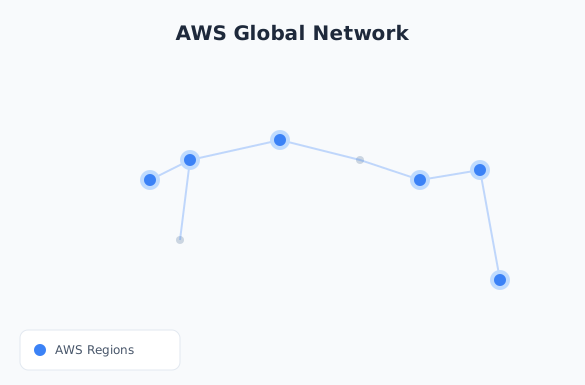
A Region is a separate geographic area where AWS has a cluster of data centers. Each region is completely independent.
- Examples:
us-east-1(N. Virginia),eu-west-1(Ireland),ap-south-1(Mumbai). - Isolation: If a disaster strikes one region (e.g., an earthquake in Tokyo), your application in N. Virginia stays unaffected.
How to Choose a Region?
Don't just pick the first one on the list! Consider:
- Latency: Choose the region closest to your users. If your users are in India, pick
ap-south-1(Mumbai). - Compliance: Laws like GDPR might require data to stay within specific borders (e.g., Germany).
- Cost: Services cost different amounts in different regions.
us-east-1is often cheaper thansa-east-1(São Paulo). - Service Availability: New services usually launch in N. Virginia first before rolling out globally.
2. Availability Zones (AZs)
The Data Centers.
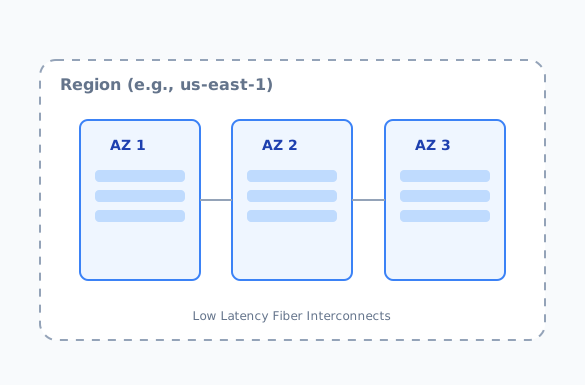
Inside every Region, there are multiple Availability Zones (AZs). An AZ is one or more discrete data centers with redundant power, networking, and connectivity.
- Structure: A Region (e.g., Mumbai) has AZs like
ap-south-1a,ap-south-1b,ap-south-1c. - Distance: AZs are physically separated by miles (to avoid shared disasters like floods/fires) but connected by ultra-low latency fiber.
Why use multiple AZs? High Availability.
If you run your server in only one AZ (1a) and that data center loses power, your site goes down.
If you run servers in 1a and 1b, and 1a fails, your site keeps running from 1b.
3. Edge Locations
The Cache Points.
Edge Locations are not for running your main servers. They are small data centers located in major cities all over the world—far more numerous than Regions.
- Purpose: They deliver content to users with the lowest possible latency.
- Service: Used primarily by Amazon CloudFront (CDN).
How it works:
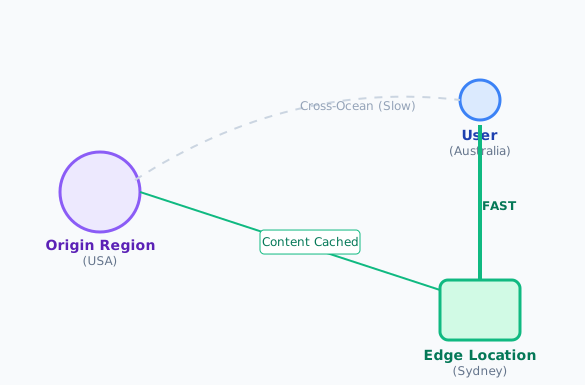
- You host a video file in the
us-east-1Region. - A user in Australia requests the video.
- Instead of traveling all the way to the US, AWS delivers a cached copy of the video from an Edge Location in Sydney.
4. Beyond Regions: Local Zones & Wavelength
AWS is getting closer to the end-user with these specialized infrastructure types.
AWS Local Zones
Local Zones extend an AWS Region to place compute, storage, and database services closer to large population, industry, and IT centers.
- Example: Your main region is
us-west-2(Oregon), but you enable the Los Angeles Local Zone to serve media content to Hollywood studios with single-digit millisecond latency.
AWS Wavelength
Wavelength zones typically sit inside 5G network providers' data centers.
- Use Case: Ultra-low latency applications for mobile devices, like game streaming or AR/VR, where you want to skip the internet hop and process data right at the "edge" of the 5G network.
5. Global vs. Regional Services
Not all AWS services live in a region. Some operate globally.
| Scope | Services | Description |
|---|---|---|
| Regional | EC2, Lambda, S3, RDS, VPC | You must select a specific region (e.g., us-east-1) to use them. Data doesn't leave that region unless you move it. |
| Global | IAM, Route 53, CloudFront, WAF | These services manage resources across all regions simultaneously. You don't "deploy" IAM users to Mumbai; they exist globally. |
6. Sustainability & The Green Cloud
AWS has committed to powering its operations with 100% renewable energy by 2025. When choosing a region, you can also consider the carbon footprint.
- Many regions (like
us-west-2,eu-west-1) are already carbon neutral. - AWS provides a Customer Carbon Footprint Tool to help you understand the environmental impact of your workloads.
Summary
| Component | What is it? | Use it for... |
|---|---|---|
| Region | A major geographic area (e.g., Mumbai). | Hosting your main infrastructure where your users are. |
| Availability Zone (AZ) | Isolated data centers within a Region. | Redundancy. If one AZ fails, the other takes over. |
| Edge Location | A caching point in a specific city. | Delivering static content (images, videos) fast via CDN. |
| Local Zone | Extension of a region into a specific city. | Ultra-low latency for specific geographic populations. |
Mastering this hierarchy allows you to build systems that are resilient (using multi-AZ), fast (using Edge Locations), and sustainable.